Spark
Spark is a unified command launcher that allows you to search and execute Maya MEL commands, Maya Runtime commands, and your own custom tools from a single, streamlined interface. It minimizes menu-diving by bringing all your essential actions into a searchable HUD.
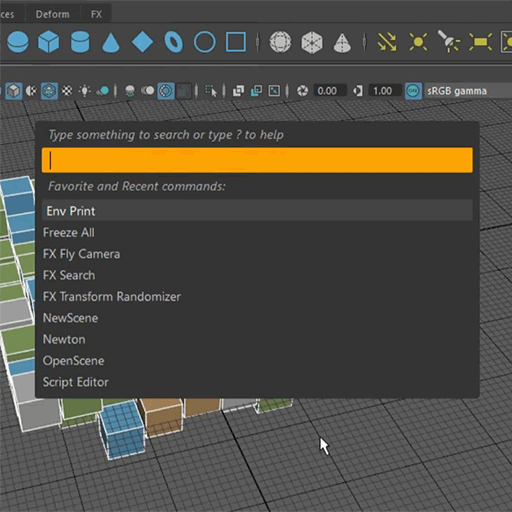
Features
Unified Launcher
Execute Maya MEL commands, Runtime commands, and your own tools within a single interface.
Smart History
Access your five most recent and five most popular commands as soon as the interface appears.
Contextual Prefixes
Use specific symbols (@, #, !) to filter search results by command type or search globally.
Custom Tool Support
Add your own tools by simply listing them in human-readable YAML configuration files.
Video
Usage
Upon launching Spark, you are presented with your five most recent and five most popular commands. You can navigate this list using the Up/Down arrows and hitting Enter, or by double-clicking a command to execute it.
To search for specific tools or commands, use the following prefixes:
No prefix– Search within Spark’s built-in or your own tools.@– Search within Maya MEL commands.#– Search within Maya Runtime commands.!– Search everywhere simultaneously.
Adding Tools
You can add custom tools to Spark by editing simple YAML configuration files:
- User Configuration (Recommended) – Type
Spark Configuration Directoryinto the tool and execute it to open the folder in your file explorer. Add your tool descriptions totools_list_user.yaml. - Global Configuration – Manually edit
fxpt/fx_spark/tools_list.yamlwithin your installation folder.
Both files are simple YAML configs with straightforward syntax.
Setup
Installation
Spark is part of the FX Python Tools library. Download fxpt from GitHub and add it to your PYTHONPATH directory.
How to Run
Spark is handy when assigned to hotkey, so make one with the following Python code:
from fxpt.fx_spark import fx_spark
fx_spark.run()Compatibility
Tested on
Maya 2016
Maya 2017
Maya 2022 (with “-pythonver 2” flag)
Requirements
Maya versions using a Python 2.7 interpreter