Renamer
Renamer is a utility for batch-renaming selected nodes. It is designed to handle hierarchical renaming by managing object dependencies, which prevents the common “No object matches name” errors that occur when a parent node is renamed before its children.
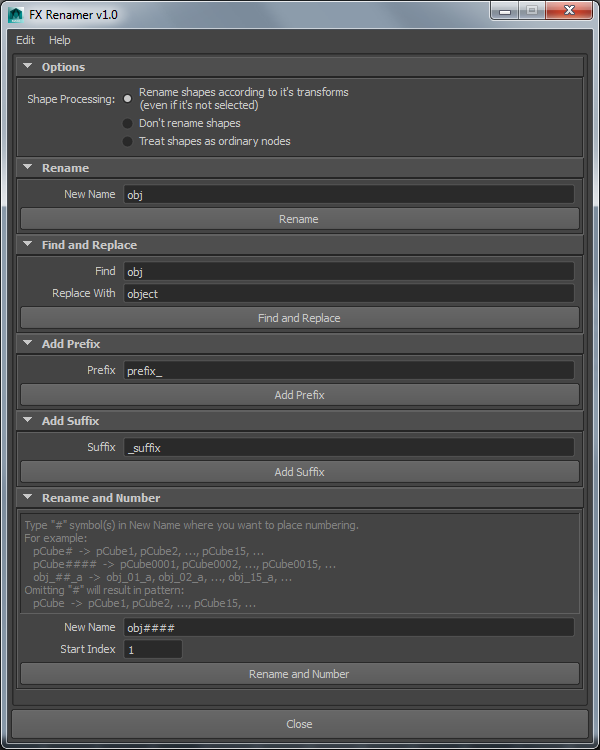
Renaming Modes
Rename
Renames objects to a specific string. Any name conflicts are resolved using Maya’s internal mechanism.
Find and Replace
Leaves shape nodes untouched during the renaming process.
Add Prefix
Prepends a custom string to the object name.
Add Suffix
Appends a custom string to the object name.
Rename and Number
Offers granular control over numbering, including custom placement within the name, specific padding, and custom start indices.
Shape Processing
Rename shapes
Automatically renames shape nodes to match their parent transforms
Don’t rename shapes
Locates a specific string within the name and replaces it with another.
Treat shapes as nodes
Processes shape nodes as if they were ordinary nodes.
Setup
Installation
Renamer is part of the FX Python Tools library. Download fxpt from GitHub and add it to your PYTHONPATH directory.
How to Run
To launch the tool via the Script Editor or a shelf button:
from fxpt import fx_renamer
fx_renamer.run()Compatibility
Tested on
Maya 2016
Maya 2017
Maya 2022 (with “-pythonver 2” flag)
Requirements
Maya versions using a Python 2.7 interpreter